Salesforce Marketing Cloud Email Marketing Best Practices
1. Audience & Data Management
- Use Data Extensions instead of Lists for enterprise campaigns.
- Validate audience segmentation before every send.
- Apply suppression and exclusion lists.
- Remove duplicate subscribers.
- Validate customer consent (CASL/GDPR/Privacy).
- Use SQL queries to verify audience counts.
- Keep customer data synchronized with CRM/Data Cloud.
- Use unique Contact Keys to prevent duplicate customer records.
2. Email Template Design
- Use reusable templates and Content Blocks.
- Maintain consistent corporate branding.
- Keep email width between 600–640 px.
- Design mobile-first, responsive templates.
- Use optimized images to reduce load time.
- Keep layouts simple and easy to scan.
- Include clear Call-to-Action (CTA) buttons.
- Include company contact information and legal footer.
3. HTML & CSS Best Practices
- Use clean, valid HTML.
- Prefer table-based layouts for maximum email client compatibility.
- Use inline CSS where appropriate.
- Avoid JavaScript in email templates.
- Avoid unsupported CSS properties.
- Test Outlook-specific rendering.
- Validate responsive layouts on multiple screen sizes.
- Minimize overall email size.
4. Personalization & AMPscript
- Use AMPscript for personalization.
- Always provide fallback values for missing data.
- Validate merge fields.
- Test all dynamic content rules.
- Use
AttributeValue()instead of direct field references where appropriate. - Ensure no raw AMPscript or merge tags appear in production emails.
- Personalize content based on customer attributes.
5. Dynamic Content
- Build one template with multiple content variations.
- Use business rules for personalization.
- Test every audience scenario.
- Validate conditional content.
- Ensure customers receive the correct offers.
- Test default content when no rule matches.
6. Accessibility (WCAG 2.1 AA / AODA)
- Add meaningful ALT text to informative images.
- Maintain a minimum 4.5:1 colour contrast ratio.
- Use semantic heading hierarchy.
- Use descriptive link text.
- Ensure readable font sizes (16px or larger is recommended).
- Design responsive layouts.
- Avoid using images to convey essential text.
- Ensure emails are compatible with screen readers.
- Test with tools such as axe, WAVE, NVDA, or JAWS.
7. Journey Builder
- Validate entry criteria.
- Verify decision splits.
- Test wait activities.
- Prevent duplicate journey entries where required.
- Validate exit conditions.
- Test complete customer journeys.
- Verify the correct Journey version before activation.
8. Automation Studio
- Validate automation schedules.
- Confirm successful data imports.
- Validate SQL query execution.
- Refresh Data Extensions before campaigns.
- Review automation logs.
- Configure failure notifications.
- Test error handling and recovery.
9. Email Testing
Before every production release, verify:
- Subject line
- Preheader
- Personalization
- Dynamic content
- Images
- Links and CTA buttons
- HTML rendering
- CSS rendering
- Mobile responsiveness
- Accessibility
- Dark mode rendering (where supported)
- Cross-client compatibility
10. Email Rendering
Test across major email clients:
- Microsoft Outlook
- Outlook on the Web
- Gmail
- Apple Mail
- Yahoo Mail
- iPhone Mail
- Android Gmail App
11. QA Testing Tools
Recommended tools:
- Preview & Test (Salesforce Marketing Cloud)
- Email on Acid
- Litmus
- BrowserStack (Landing Pages and CloudPages)
12. A/B Testing
Validate:
- Subject lines
- Preheaders
- CTA buttons
- Email content
- Images
- Send times
- Audience split
- Winner selection criteria
- Statistical sample size (where applicable)
13. Compliance
Ensure:
- Unsubscribe link is present.
- Privacy Policy link is included.
- Company contact information is displayed.
- Sender information is accurate.
- Marketing permissions and customer consent are respected.
- Appropriate Send Classification (Commercial vs. Transactional) is configured.
14. Production Readiness Checklist
Before approving a campaign:
- Audience validated.
- SQL queries verified.
- Data Extensions updated.
- Personalization tested.
- AMPscript validated.
- Dynamic content verified.
- Accessibility requirements passed.
- HTML/CSS validated.
- All links and CTAs tested.
- Email on Acid and Litmus validation completed.
- Journey Builder workflow validated.
- Automation Studio execution verified.
- Business approval received.
- QA/QC sign-off completed before production deployment.
Data Cloud & Contact Builder
Data Cloud (Formerly Salesforce CDP)
Salesforce Data Cloud is a Customer Data Platform (CDP) that collects, connects, and unifies customer information from multiple sources such as CRM, websites, mobile apps, marketing systems, and third-party applications. It creates a single, unified customer profile that Marketing Cloud can use for advanced segmentation, personalization, analytics, and AI-driven customer journeys.
For a QA/QC Tester or Auditor, Data Cloud is important because the quality of customer data directly affects audience segmentation, personalization, and campaign accuracy. Incorrect or incomplete customer data can result in customers receiving the wrong communication or missing important marketing campaigns.
Key Features
- Unifies customer data from multiple business systems.
- Creates a Single Customer View (360° Customer Profile).
- Performs Identity Resolution to merge duplicate customer records.
- Builds audience segments for personalized marketing campaigns.
- Provides real-time customer insights for Journey Builder.
- Supports AI-driven personalization and recommendations.
- Integrates with Salesforce CRM, Marketing Cloud, Commerce Cloud and external data sources.
QA Responsibilities
- Verify customer data is synchronized correctly from source systems.
- Validate audience segmentation before campaign execution.
- Confirm customer attributes are populated correctly for personalization.
- Ensure duplicate customer records are resolved appropriately.
- Verify suppression and exclusion rules.
- Confirm only eligible customers are included in campaign audiences.
Contact Builder
Contact Builder is the central customer data management component within Salesforce Marketing Cloud. It organizes contacts, relationships, Data Extensions, and customer attributes so marketers can build personalized customer journeys and targeted campaigns.
Think of Contact Builder as the location where Salesforce Marketing Cloud stores, organizes, and relates customer information before it is used by Email Studio, Journey Builder, Automation Studio, and other Marketing Cloud applications.
Key Components
- Contacts – Stores individual customer records using a unique Contact Key.
- Data Extensions – Custom tables that store marketing and customer data.
- Attribute Groups – Connect related Data Extensions together.
- Relationships – Define how customer data tables are linked.
- Population – Groups contacts into logical audiences.
Why Contact Builder Matters
- Supports personalized email marketing.
- Provides customer attributes for AMPscript and Dynamic Content.
- Supplies audiences for Journey Builder.
- Maintains customer relationships across multiple Data Extensions.
- Ensures a single Contact Key identifies each customer.
QA Responsibilities
- Verify Data Extensions contain accurate customer data.
- Validate Contact Keys are unique and prevent duplicate customer records.
- Confirm Attribute Groups and relationships are configured correctly.
- Validate merge fields used for personalization.
- Verify customer records appear in the correct audience segments.
- Ensure suppression lists and exclusion criteria are working correctly.
- Compare Data Extension record counts against business requirements.
Data Cloud vs Contact Builder
| Data Cloud | Contact Builder |
|---|---|
| Unifies customer data from multiple enterprise systems. | Organizes customer data within Marketing Cloud. |
| Creates a 360° customer profile. | Stores Contacts, Data Extensions and relationships. |
| Performs Identity Resolution and customer matching. | Uses Contact Keys to uniquely identify customers. |
| Builds advanced audience segments. | Provides customer data to Email Studio and Journey Builder. |
| Enterprise Customer Data Platform (CDP). | Marketing Cloud customer data management. |
AMPscript
What is AMPscript?
AMPscript (Advanced Marketing Personalization Script) is Salesforce Marketing Cloud's proprietary scripting language used to personalize email content, SMS messages, landing pages, and customer journeys. It allows marketers to retrieve customer data from Data Extensions, apply business rules, display dynamic content, and personalize communications for every recipient.
Unlike standard merge fields, AMPscript can perform conditional logic, retrieve records from Data Extensions, format dates, perform calculations, and display different content based on customer attributes such as location, advisor, loyalty status, portfolio value, or language preference.
Common Uses of AMPscript
- Personalize greetings using customer names.
- Display different offers based on customer segments.
- Retrieve customer information from Data Extensions.
- Display dynamic content based on business rules.
- Show advisor information for Private Wealth clients.
- Create personalized links and landing pages.
- Handle missing customer information with fallback values.
Example 1 – Personalized Greeting
This AMPscript displays the customer's first name. If the value is missing, it displays "Valued Customer".
%%[
SET @FirstName = AttributeValue("FirstName")

IF EMPTY(@FirstName) THEN
    SET @FirstName = "Valued Customer"
ENDIF
]%%

Hello %%=v(@FirstName)=%%,
Welcome to a Bank Private Wealth.
Output
- Hello Michael, Welcome to a Bank Private Wealth.
- Hello Valued Customer, Welcome to a Bank Private Wealth.
Example 2 – Dynamic Content Based on Customer Tier
This example displays different messaging depending on the client's wealth segment.
%%[
SET @Tier = AttributeValue("ClientTier")

IF @Tier == "Platinum" THEN

]%%

Exclusive Wealth Management Benefits

%%[ ELSE ]%%

Explore Our Premium Banking Solutions

%%[ ENDIF ]%%
Example 3 – Lookup Customer Advisor
This example retrieves the customer's assigned advisor from a Data Extension.
%%[
SET @Advisor =
Lookup(
    "AdvisorDE",
    "AdvisorName",
    "ClientID",
    AttributeValue("ClientID")
)
]%%

Your dedicated advisor is:
%%=v(@Advisor)=%%
Common AMPscript Functions
AttributeValue()– Retrieves a customer attribute safely.Lookup()– Retrieves a single value from a Data Extension.LookupRows()– Returns multiple records.EMPTY()– Checks whether a value exists.IIF()– Inline IF statement.FormatDate()– Formats dates.ProperCase()– Converts text to Proper Case.Concat()– Combines text values.
QA Responsibilities
- Validate all merge fields before production.
- Verify AMPscript executes without errors.
- Test every conditional business rule.
- Confirm fallback values display correctly.
- Ensure no raw AMPscript appears in production emails.
- Validate dynamic content for every audience segment.
- Verify Data Extension lookups return the correct customer information.
- Test personalization using multiple customer profiles.
For a QA/QC Auditor, you are not expected to write complex AMPscript from scratch, but you should understand how to validate personalization, conditional logic, Data Extension lookups, fallback values, and dynamic content to ensure every customer receives the correct communication.
AMPscript is Salesforce Marketing Cloud's scripting language used to personalize emails and customer journeys. It retrieves customer information from Data Extensions, applies business rules, and displays dynamic content based on customer attributes. From a QA perspective, I validate AMPscript logic, merge fields, fallback values, Data Extension lookups, and conditional content to ensure personalized emails render correctly for every customer before production.
Journey Builder Flow
What is Journey Builder?
Journey Builder is Salesforce Marketing Cloud's automation engine that creates personalized, multi-step customer journeys across multiple communication channels such as Email, SMS, Push Notifications, Mobile, Advertising, and CloudPages. It automatically delivers the right message to the right customer at the right time based on customer behavior, business rules, and real-time data.
Instead of sending a single email blast, Journey Builder allows organizations to guide customers through a complete marketing experience using automated workflows. Each customer follows a personalized path depending on their actions, profile, preferences, or business conditions.
Why Organizations Use Journey Builder
- Automate customer communications.
- Create personalized customer experiences.
- Send emails based on customer behaviour.
- Deliver multi-step onboarding campaigns.
- Send reminders, follow-ups and notifications.
- Reduce manual marketing effort.
- Increase customer engagement and conversion rates.
Example: Private Wealth Welcome Journey
Suppose a new client opens a Private Wealth investment account at a Bank. Journey Builder can automatically guide that client through a personalized welcome experience without manual intervention.
Send Investment Guide ↓
Wait 5 Days ↓
Advisor Follow-up Email
Send Reminder Email ↓
Wait 3 Days ↓
Re-enter Journey
Key Components of Journey Builder
- Entry Source – Defines how customers enter the journey (Data Extension, API, Salesforce Event, etc.).
- Activities – Actions performed during the journey such as sending an email or SMS.
- Decision Split – Routes customers down different paths based on business rules.
- Wait Activity – Delays the next communication for a specified period.
- Goals – Measures whether customers achieve the intended outcome.
- Exit Criteria – Determines when customers leave the journey.
Typical Journey Builder Activities
- Email Send
- SMS Send
- Push Notification
- Decision Split
- Wait Activity
- Update Contact
- Salesforce Activity
- CloudPage
QA Responsibilities
- Validate the Entry Source contains the correct audience.
- Verify customer segmentation before activation.
- Test Decision Split business rules.
- Validate Wait Activities.
- Ensure customers follow the correct journey path.
- Verify dynamic content and AMPscript personalization.
- Validate suppression lists and exclusion rules.
- Ensure customers do not enter the journey multiple times unless intended.
- Verify Exit Criteria.
- Perform end-to-end regression testing before production.
Common Journey Builder Defects
- Incorrect audience entering the journey.
- Broken Decision Split logic.
- Incorrect wait duration.
- Duplicate customer entries.
- Personalization failures.
- Dynamic content displaying incorrectly.
- Broken links or images.
- Emails sent in the wrong sequence.
When discussing Journey Builder, don't simply say "I test the emails." Explain that you validate the entire customer journey, including the Entry Source, Decision Splits, Wait Activities, audience segmentation, AMPscript personalization, suppression rules, and end-to-end customer experience before approving production.
Journey Builder is Salesforce Marketing Cloud's automation tool that creates personalized customer journeys across multiple channels. It automates the delivery of emails and other communications based on customer behaviour, business rules, and real-time data. As a QA/QC Auditor, I validate the Entry Source, audience segmentation, Decision Splits, Wait Activities, AMPscript, dynamic content, suppression rules, and complete end-to-end journey flow to ensure customers receive the correct communication at the right time.
Journey Builder Workflow Example
The example below illustrates a typical Salesforce Marketing Cloud Journey Builder workflow. Customers enter the journey through a Data Extension, receive personalized email communications, wait for defined periods, pass through decision and engagement splits, and may receive additional messages such as Email, SMS, or Push Notifications before exiting the journey.
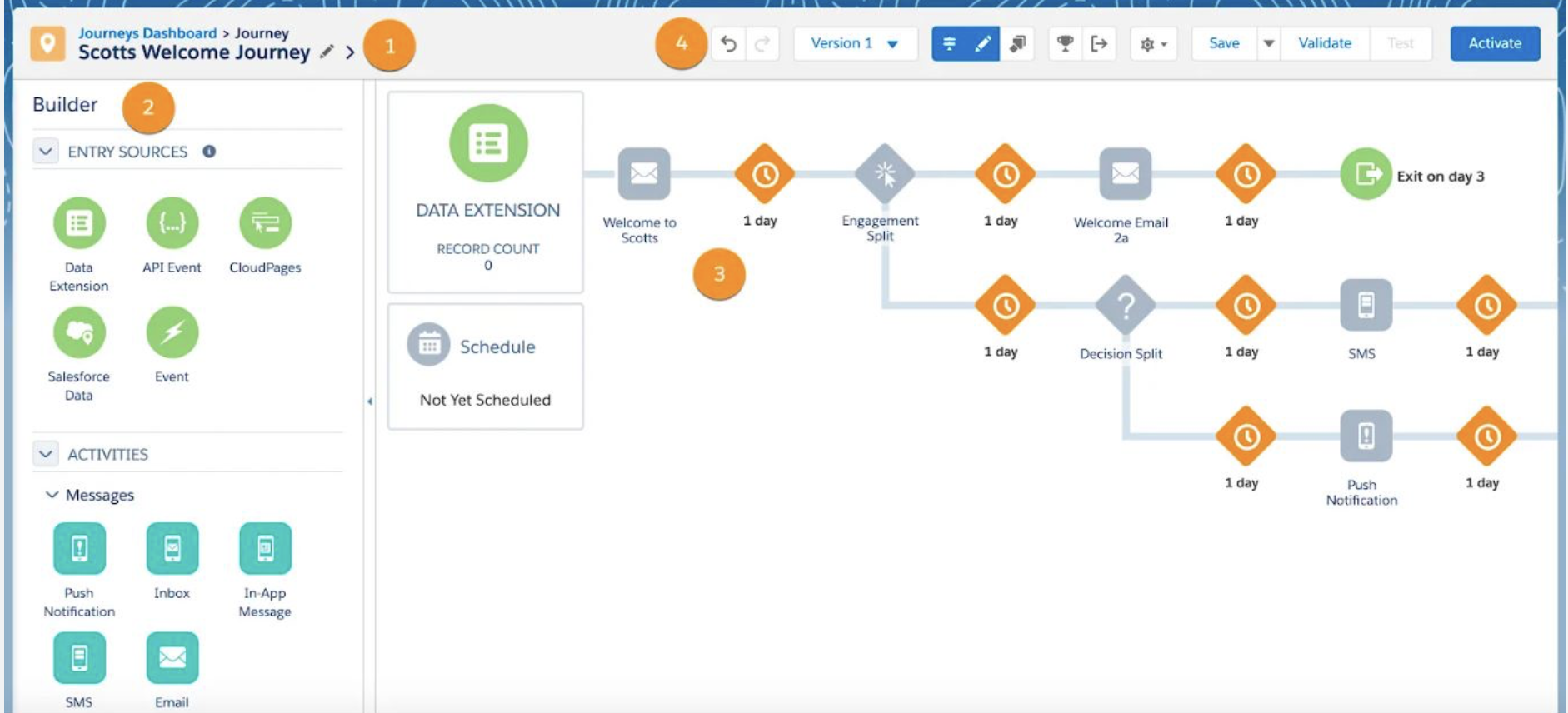
Figure: Example of a Salesforce Marketing Cloud Journey Builder workflow showing Entry Sources, Email Activities, Wait Activities, Engagement Splits, Decision Splits, SMS, Push Notifications, and Exit Criteria.
Automation Studio Flow
What is Automation Studio?
Automation Studio is Salesforce Marketing Cloud's backend automation tool used to automate repetitive marketing processes such as importing files, running SQL queries, refreshing Data Extensions, segmenting audiences, and preparing customer data before marketing campaigns are sent.
Unlike Journey Builder, which focuses on customer communications, Automation Studio works behind the scenes to ensure customer data is accurate, up to date, and ready for Email Studio and Journey Builder.
Why Organizations Use Automation Studio
- Import customer data automatically.
- Refresh Data Extensions on a schedule.
- Run SQL queries for audience segmentation.
- Clean and transform customer data.
- Create suppression and exclusion lists.
- Schedule recurring marketing processes.
- Reduce manual effort and improve data accuracy.
Typical Automation Workflow
Automation Studio Activities
- Import File Activity – Imports customer data into Marketing Cloud.
- SQL Query Activity – Creates or refreshes audience Data Extensions.
- Filter Activity – Builds audiences without writing SQL.
- Data Extract Activity – Exports Marketing Cloud data.
- File Transfer Activity – Encrypts, decrypts, or transfers files using FTP.
- Script Activity – Executes server-side scripts for advanced automation.
- Verification Activity – Confirms a file exists before continuing the automation.
Real Banking Example
Every night at 2:00 AM, a Bank receives an updated customer file from its core banking system containing new investment clients, account updates, and customer preferences. Automation Studio automatically processes this data before the next day's marketing campaigns begin.
QA Responsibilities
- Verify automation schedules.
- Confirm files import successfully.
- Validate SQL query execution.
- Verify Data Extension record counts.
- Confirm audience segmentation is correct.
- Validate suppression lists.
- Review automation logs for failures.
- Verify notifications are configured for errors.
- Test recovery after failed automation runs.
- Ensure downstream Journey Builder receives the correct audience.
Common Automation Studio Defects
- Import file failed.
- SQL query returned incorrect audience.
- Duplicate customer records.
- Automation executed at the wrong time.
- Data Extension not refreshed.
- Suppression list missing customers.
- Incorrect file mapping.
- Journey Builder started before data was ready.
Automation Studio vs Journey Builder
| Automation Studio | Journey Builder |
|---|---|
| Processes customer data. | Communicates with customers. |
| Runs SQL queries. | Sends emails and SMS. |
| Imports and exports files. | Uses customer behaviour. |
| Updates Data Extensions. | Uses Decision Splits. |
| Runs on schedules. | Runs customer journeys. |
| Backend automation. | Customer engagement automation. |
Think of Automation Studio as the engine that prepares customer data before any campaign begins. As a QA/QC Auditor, your responsibility is to validate imports, SQL queries, Data Extensions, automation schedules, audience counts, suppression lists, and downstream dependencies so Journey Builder receives accurate customer data.
Automation Studio automates backend marketing processes such as importing customer files, running SQL queries, refreshing Data Extensions, and preparing audiences for marketing campaigns. Unlike Journey Builder, which communicates with customers, Automation Studio prepares the data that Journey Builder relies on. From a QA perspective, I validate imports, SQL execution, audience counts, Data Extensions, automation schedules, suppression rules, and ensure every automation completes successfully before campaigns are launched.
CASL & Privacy
CASL & Privacy Compliance
CASL (Canada's Anti-Spam Legislation) is Canada's law that regulates the sending of Commercial Electronic Messages (CEMs), including marketing emails, SMS messages, and other electronic communications. Organizations must obtain appropriate customer consent before sending marketing communications and must provide recipients with an easy way to unsubscribe.
For organizations such as a Bank, complying with CASL is essential to protect customer trust, avoid regulatory penalties, and ensure marketing campaigns are sent only to customers who have granted the appropriate permissions.
CASL Requirements
- Obtain customer consent before sending commercial emails.
- Include a clear unsubscribe link in every marketing email.
- Display accurate sender information.
- Include company contact information.
- Respect customer opt-out requests promptly.
- Maintain records of customer consent where required.
Privacy Best Practices
- Protect customer personal information.
- Limit access to sensitive customer data.
- Use customer data only for authorized business purposes.
- Validate audience eligibility before every campaign.
- Prevent unauthorized customer communications.
- Follow corporate privacy and security policies.
How Salesforce Marketing Cloud Supports Compliance
- Publication Lists – Allow customers to unsubscribe from specific types of communications.
- Suppression Lists – Prevent certain customers from receiving marketing emails.
- Data Extensions – Store customer consent status and marketing preferences.
- Send Classifications – Differentiate Commercial and Transactional email communications.
- Journey Builder – Can automatically remove customers who withdraw consent.
- Automation Studio – Refreshes suppression and exclusion lists before campaigns are sent.
QA Responsibilities
- Verify customer consent before production sends.
- Validate suppression and exclusion lists.
- Confirm unsubscribe links function correctly.
- Ensure opt-out customers do not receive marketing emails.
- Verify sender name and sender email address.
- Confirm company contact information appears in every email.
- Validate the correct Send Classification is used.
- Verify privacy-related customer attributes are accurate.
- Review audience segmentation to ensure only eligible customers receive communications.
- Perform compliance validation before production approval.
Common Compliance Defects
- Email sent to customers without valid consent.
- Suppression list not applied.
- Broken unsubscribe link.
- Incorrect sender information.
- Missing company contact information.
- Commercial email sent using the wrong Send Classification.
- Opted-out customers still receiving marketing communications.
As a QA/QC Auditor, your responsibility is not to interpret legal requirements, but to verify that every marketing campaign follows established compliance controls. This includes validating customer consent, suppression lists, unsubscribe functionality, sender information, and ensuring only eligible customers receive commercial communications.
CASL is Canada's Anti-Spam Legislation, which requires organizations to obtain customer consent before sending commercial electronic messages. Within Salesforce Marketing Cloud, compliance is supported through Publication Lists, Suppression Lists, Data Extensions, and Send Classifications. As a QA/QC Auditor, verify customer consent, suppression rules, unsubscribe functionality, audience segmentation, sender information, and ensure campaigns meet compliance requirements before production deployment.
Accessibility (WCAG)
Accessibility & WCAG 2.1 AA
Web Content Accessibility Guidelines (WCAG) are internationally recognized standards developed by the World Wide Web Consortium (W3C) to make digital content accessible to people with disabilities. Although WCAG was originally developed for websites, many organizations—including banks such as a Bank—apply these same accessibility principles to marketing emails, landing pages, and other customer communications.
Accessible emails ensure that customers who use assistive technologies such as screen readers, keyboard navigation, or high-contrast displays can successfully read and interact with marketing communications. Accessibility is an important part of delivering an inclusive customer experience while meeting legal and organizational accessibility standards.
The Four WCAG Principles (POUR)
- Perceivable – Information must be presented in ways users can perceive, such as providing alternative text for images.
- Operable – Users must be able to navigate and interact with content using a keyboard or assistive technology.
- Understandable – Content should be clear, readable, and predictable.
- Robust – Content should work reliably across browsers, email clients, and assistive technologies.
Accessibility Best Practices for Email Marketing
- Provide meaningful ALT text for informative images.
- Maintain a minimum colour contrast ratio of 4.5:1 for normal text.
- Use a logical heading hierarchy (H1, H2, H3).
- Use descriptive link text instead of generic phrases like "Click Here."
- Use readable font sizes (16px or larger is commonly recommended).
- Design responsive emails that adapt to different screen sizes.
- Avoid placing important information inside images.
- Ensure buttons are large enough to be easily selected on mobile devices.
- Keep layouts simple and easy to navigate.
- Use sufficient spacing between clickable elements.
Accessibility Testing Tools
- axe DevTools – Automated accessibility testing.
- WAVE – Evaluates web accessibility and highlights issues.
- NVDA – Free Windows screen reader used for accessibility testing.
- JAWS – Commercial screen reader commonly used by organizations.
- Email on Acid – Validates email accessibility and rendering.
- Litmus – Tests accessibility and rendering across email clients.
QA Responsibilities
- Verify meaningful ALT text is provided for all informative images.
- Validate colour contrast meets WCAG 2.1 AA requirements.
- Ensure heading structure follows a logical hierarchy.
- Verify descriptive hyperlinks and CTA buttons.
- Confirm responsive layouts on desktop and mobile devices.
- Ensure emails remain readable when images are disabled.
- Validate screen reader compatibility where applicable.
- Review keyboard accessibility for landing pages and CloudPages.
- Perform accessibility testing using approved tools.
- Document and report accessibility defects before production.
Common Accessibility Defects
- Missing ALT text on images.
- Poor colour contrast.
- Incorrect heading hierarchy.
- Images containing important text with no text alternative.
- Very small font sizes.
- Generic hyperlinks such as "Click Here."
- Buttons too small for mobile devices.
- Email unreadable when images are blocked.
- Screen readers reading content incorrectly.
Example Accessibility Checklist
- ✔ ALT text verified.
- ✔ Colour contrast validated.
- ✔ Headings structured correctly.
- ✔ Links are descriptive.
- ✔ Responsive layout tested.
- ✔ Screen reader compatibility reviewed.
- ✔ Images disabled test completed.
- ✔ CTA buttons accessible on desktop and mobile.
- ✔ Email passes accessibility validation tools.
Accessibility testing is not limited to websites. Financial institutions apply WCAG principles to customer emails to ensure communications are accessible to everyone. As a QA/QC Auditor, your role is to validate accessibility before production by reviewing ALT text, colour contrast, heading structure, responsive design, screen reader compatibility, and overall usability.
WCAG 2.1 AA provides internationally recognized accessibility standards for digital content. In Salesforce Marketing Cloud, these principles are applied to marketing emails to ensure they are accessible to all customers, including those using assistive technologies. As a QA/QC Auditor, validate ALT text, colour contrast, responsive layouts, heading hierarchy, descriptive links, screen reader compatibility, and accessibility testing results before approving campaigns for production.
Email Testing Tools
Email Testing Tools
Before any email campaign is released to production, it should undergo thorough testing to ensure it renders correctly, functions as expected, meets accessibility standards, and provides a consistent customer experience across email clients and devices. Salesforce Marketing Cloud supports built-in testing capabilities, while third-party tools provide additional validation for rendering, accessibility, and cross-platform compatibility.
As a QA/QC Auditor, using the appropriate testing tools helps identify defects before production, reducing the risk of broken emails, incorrect personalization, or accessibility issues reaching customers.
Common Email Testing Tools
| Tool | Primary Purpose | Typical QA Validation |
|---|---|---|
| Preview & Test (SFMC) | Preview emails using subscriber data before sending. | Merge fields, AMPscript, personalization, dynamic content, test sends. |
| Email on Acid | Cross-client rendering and accessibility testing. | Email rendering, broken links, image validation, accessibility, spam testing. |
| Litmus | Email rendering and collaboration platform. | Rendering across clients, accessibility, proofing, approvals, analytics. |
| BrowserStack | Cross-browser testing for landing pages and CloudPages. | Responsive design, browser compatibility, mobile testing. |
1. Preview & Test (Salesforce Marketing Cloud)
Preview & Test is Salesforce Marketing Cloud's built-in testing feature. It allows QA teams to preview emails using actual subscriber data before sending them to customers.
- Validate merge fields.
- Test AMPscript personalization.
- Preview Dynamic Content.
- Verify customer-specific messaging.
- Send test emails to reviewers.
2. Email on Acid
Email on Acid is a specialized email testing platform that validates how emails render across dozens of email clients, browsers, and mobile devices. It also provides accessibility testing, link validation, image verification, and spam analysis.
- Cross-client rendering.
- Accessibility validation.
- Broken link detection.
- Image verification.
- Dark mode preview.
- Spam filter testing.
3. Litmus
Litmus provides many of the same rendering capabilities as Email on Acid but also includes collaboration features that allow marketing, design, and QA teams to review, comment on, and approve emails before production.
- Email rendering across clients.
- Accessibility testing.
- Team collaboration and approvals.
- Email proofing.
- Post-send engagement analytics.
4. BrowserStack
BrowserStack is primarily used for testing web pages rather than email rendering. Within Salesforce Marketing Cloud, it is commonly used to validate CloudPages, landing pages, preference centers, and forms across multiple browsers and devices.
- Responsive layout testing.
- Cross-browser compatibility.
- Mobile device testing.
- CloudPages validation.
- Landing page QA.
QA Responsibilities
- Validate merge fields and personalization.
- Verify AMPscript executes correctly.
- Confirm Dynamic Content displays correctly.
- Validate links and CTA buttons.
- Verify images render correctly.
- Review HTML and CSS rendering.
- Test mobile responsiveness.
- Validate accessibility (WCAG 2.1 AA).
- Test dark mode rendering where applicable.
- Confirm compatibility across major email clients.
- Document and resolve defects before production.
Common Defects Found Using Testing Tools
- Broken personalization.
- AMPscript errors.
- Incorrect Dynamic Content.
- Broken hyperlinks.
- Missing images.
- Poor Outlook rendering.
- Accessibility violations.
- Dark mode display issues.
- Responsive layout problems.
- Spam trigger warnings.
Each testing tool serves a different purpose. Preview & Test validates customer personalization within Salesforce Marketing Cloud, Email on Acid and Litmus verify email rendering and accessibility across email clients, while BrowserStack focuses on browser compatibility for CloudPages and landing pages. Together, these tools help ensure a consistent and high-quality customer experience before production.
Before production, use Salesforce Marketing Cloud's Preview & Test to validate merge fields, AMPscript, and Dynamic Content. I then use Email on Acid or Litmus to verify rendering, accessibility, links, images, and compatibility across email clients. For CloudPages and landing pages, BrowserStack is used to confirm responsive behaviour across browsers and devices. This layered testing approach helps identify defects early and ensures campaigns meet quality and compliance standards before release.
Most Common SQL Queries
SQL Queries in Salesforce Marketing Cloud
Structured Query Language (SQL) is one of the most commonly used tools within Salesforce Marketing Cloud. SQL Query Activities in Automation Studio retrieve, filter, join, and transform data stored in Data Extensions. As a QA/QC Auditor, you should understand how SQL is used to validate customer data, build audiences, remove duplicates, and verify campaign readiness.
1. Select All Records
Retrieve every record from a Data Extension.
SELECT *
FROM Customers
2. Select Specific Columns
SELECT
    FirstName,
    LastName,
    EmailAddress
FROM Customers
3. Filter Records
SELECT *
FROM Customers
WHERE Province = 'Ontario'
4. Multiple Conditions
SELECT *
FROM Customers
WHERE Province = 'Ontario'
AND Status = 'Active'
5. OR Condition
SELECT *
FROM Customers
WHERE Province = 'Ontario'
OR Province = 'Quebec'
6. Sort Records
SELECT *
FROM Customers
ORDER BY LastName ASC
7. Remove Duplicate Records
SELECT DISTINCT EmailAddress
FROM Customers
8. Count Records
SELECT COUNT(*) AS TotalCustomers
FROM Customers
9. Count Records by Group
SELECT
    Province,
    COUNT(*) AS CustomerCount
FROM Customers
GROUP BY Province
10. Find Duplicate Email Addresses
SELECT
    EmailAddress,
    COUNT(*) AS DuplicateCount
FROM Customers
GROUP BY EmailAddress
HAVING COUNT(*) > 1
11. INNER JOIN
Return matching records from two Data Extensions.
SELECT
    c.FirstName,
    c.EmailAddress,
    o.OrderNumber
FROM Customers c
INNER JOIN Orders o
ON c.CustomerID = o.CustomerID
12. LEFT JOIN
Return all customers, even if no matching order exists.
SELECT
    c.FirstName,
    o.OrderNumber
FROM Customers c
LEFT JOIN Orders o
ON c.CustomerID = o.CustomerID
13. Find Customers Without Orders
SELECT
    c.CustomerID,
    c.FirstName
FROM Customers c
LEFT JOIN Orders o
ON c.CustomerID = o.CustomerID
WHERE o.CustomerID IS NULL
14. Exclude Suppression List
SELECT
    c.*
FROM Customers c
LEFT JOIN SuppressionList s
ON c.EmailAddress = s.EmailAddress
WHERE s.EmailAddress IS NULL
15. Filter by Date
SELECT *
FROM Customers
WHERE CreatedDate >= '2026-01-01'
16. Last 30 Days
SELECT *
FROM Customers
WHERE CreatedDate >= DATEADD(day,-30,GETDATE())
17. Top Records
SELECT TOP 100 *
FROM Customers
18. Active Subscribers
SELECT *
FROM Customers
WHERE Status = 'Active'
19. Customers with Marketing Consent
SELECT *
FROM Customers
WHERE MarketingConsent = 'Yes'
20. Audience Segmentation
SELECT
    FirstName,
    EmailAddress,
    LoyaltyLevel
FROM Customers
WHERE LoyaltyLevel = 'Gold'
Common SQL Functions
| Function | Purpose |
|---|---|
| COUNT() | Count records |
| SUM() | Total values |
| AVG() | Average value |
| MIN() | Lowest value |
| MAX() | Highest value |
| DISTINCT | Remove duplicate records |
| GETDATE() | Current date and time |
| DATEADD() | Add or subtract dates |
| ISNULL() | Replace NULL values |
| CAST() | Convert data types |
QA Responsibilities
- Validate SQL syntax before execution.
- Verify the correct Data Extensions are referenced.
- Confirm record counts match business expectations.
- Validate JOIN conditions return the correct audience.
- Verify duplicate Contact Keys and Email Addresses are removed.
- Confirm suppression and exclusion lists are applied.
- Validate customer consent filters (CASL/GDPR).
- Review SQL Query Activity execution logs.
- Verify output Data Extensions contain the expected records.
- Perform regression testing before production deployment.
Most SQL work in Salesforce Marketing Cloud is performed within Automation Studio using SQL Query Activities. As a QA/QC Auditor, you are not expected to design complex database solutions, but you should be comfortable reading SQL, validating query logic, checking audience counts, identifying duplicates, confirming joins, and ensuring the correct customer data is delivered to downstream campaigns.
SQL in Salesforce Marketing Cloud is primarily used to segment audiences, refresh Data Extensions, remove duplicates, apply suppression lists, and prepare customer data for Journey Builder and Email Studio. From a QA perspective, I validate SQL queries by reviewing syntax, verifying joins and filters, confirming record counts, checking for duplicate contacts, and ensuring the output Data Extension contains the correct audience before approving a campaign for production.
QA Checklist
Quality Assurance (QA) Checklist
A Quality Assurance (QA) Checklist is a structured list of validation activities performed before an email campaign is approved for production. The goal is to identify defects early, ensure customer communications are accurate, compliant, accessible, and deliver a consistent experience across all email clients and devices.
As an SFMC QA/QC Auditor, the checklist helps verify every aspect of a campaign, from audience selection and personalization to rendering, accessibility, and compliance, reducing the risk of production issues.
1. Audience & Data Validation
- Verify the correct audience is selected.
- Confirm Data Extensions contain accurate customer data.
- Validate audience segmentation.
- Verify Contact Keys are unique.
- Confirm customer consent (CASL/GDPR).
- Validate suppression and exclusion lists.
- Review SQL query results and audience counts.
2. Personalization & AMPscript
- Verify merge fields display correctly.
- Validate AMPscript executes without errors.
- Confirm fallback values are displayed when data is missing.
- Test Dynamic Content for every audience scenario.
- Ensure no raw AMPscript or merge tags appear in the email.
3. Email Content Validation
- Verify subject line accuracy.
- Validate preheader text.
- Review email copy for grammar and spelling.
- Confirm branding and corporate design standards.
- Validate images and logos.
- Verify CTA buttons and hyperlinks.
- Ensure legal disclaimer and company contact information are present.
4. HTML & Rendering Validation
- Validate HTML structure.
- Verify CSS renders correctly.
- Confirm responsive behaviour on desktop and mobile.
- Test Outlook rendering.
- Validate Gmail, Apple Mail, Yahoo Mail, and mobile clients.
- Review dark mode rendering where supported.
5. Accessibility Validation (WCAG 2.1 AA)
- Verify meaningful ALT text for images.
- Validate colour contrast.
- Confirm logical heading hierarchy.
- Review descriptive hyperlinks.
- Ensure readable font sizes.
- Confirm screen reader compatibility.
- Verify responsive layouts.
6. Journey Builder Validation
- Validate Entry Source.
- Verify Decision Splits.
- Confirm Wait Activities.
- Validate Exit Criteria.
- Test complete customer journey.
- Ensure customers follow the correct journey path.
7. Automation Studio Validation
- Verify automation schedules.
- Confirm successful data imports.
- Validate SQL Query Activities.
- Refresh Data Extensions.
- Review automation logs.
- Verify failure notifications.
8. Compliance Validation
- Verify unsubscribe link.
- Confirm Privacy Policy link.
- Validate sender information.
- Review Send Classification.
- Confirm customer consent.
- Verify suppression lists.
9. Testing Tools Validation
- Preview & Test completed.
- Email on Acid validation passed.
- Litmus rendering review completed.
- BrowserStack validation completed (CloudPages/Landing Pages).
10. Production Readiness
- Business approval received.
- QA defects resolved.
- Regression testing completed.
- Production deployment approved.
- Campaign scheduled.
- Post-deployment monitoring planned.
Complete Production QA Checklist
- ☐ Audience validated
- ☐ Data Extensions verified
- ☐ SQL queries validated
- ☐ Contact Keys reviewed
- ☐ Customer consent confirmed
- ☐ Suppression lists applied
- ☐ Subject line approved
- ☐ Preheader verified
- ☐ Merge fields tested
- ☐ AMPscript validated
- ☐ Dynamic Content tested
- ☐ Images verified
- ☐ Links tested
- ☐ CTA buttons verified
- ☐ HTML validated
- ☐ CSS rendering verified
- ☐ Mobile responsiveness tested
- ☐ Accessibility passed
- ☐ Outlook rendering verified
- ☐ Gmail rendering verified
- ☐ Email on Acid completed
- ☐ Litmus review completed
- ☐ Journey Builder validated
- ☐ Automation Studio validated
- ☐ Unsubscribe link verified
- ☐ Business approval received
- ☐ QA/QC sign-off completed
A structured QA checklist ensures that no critical validation step is missed before production. Rather than relying on memory, experienced QA professionals follow a repeatable checklist covering data, personalization, rendering, accessibility, compliance, automation, and business approval to reduce production risk and maintain consistent quality.
Before production, follow a comprehensive QA checklist that covers audience validation, Data Extensions, SQL queries, AMPscript, Dynamic Content, rendering, accessibility, Journey Builder, Automation Studio, compliance, and business approval. Using a structured checklist helps ensure every campaign is accurate, accessible, compliant, and ready for a successful production release.
Spam in Salesforce Marketing Cloud
What is Spam?
Spam refers to unsolicited or unwanted email messages sent to recipients without their permission. Internet Service Providers (ISPs) such as Gmail, Outlook, and Yahoo use sophisticated filtering systems to determine whether an email should be delivered to the inbox, sent to the junk folder, or blocked entirely.
Why Spam Matters
Even a professionally designed email campaign can fail if spam filters determine that the message is suspicious. High spam rates reduce email deliverability, damage sender reputation, and can result in emails being blocked from reaching customers.
Common Causes of Spam
| Issue | Description |
|---|---|
| No Customer Consent | Sending emails without subscriber permission violates CASL, GDPR, and CAN-SPAM requirements. |
| Spam Trigger Words | Using excessive promotional language such as "FREE", "WIN", "URGENT", or "LIMITED OFFER". |
| Poor HTML Design | Broken HTML, excessive images, missing ALT text, or poor formatting. |
| Large Images | Image-only emails with very little text often trigger spam filters. |
| Broken Links | Invalid URLs or redirects reduce sender trust. |
| Missing Unsubscribe Link | Compliance links are mandatory for commercial emails. |
| High Complaint Rate | Recipients marking emails as spam damages sender reputation. |
| Purchased Email Lists | Using non-permission-based mailing lists significantly increases spam complaints. |
Spam Prevention Best Practices
- Send emails only to customers who have provided consent.
- Maintain a healthy sender reputation.
- Authenticate domains using SPF, DKIM, and DMARC.
- Avoid excessive capitalization and punctuation.
- Balance text and images.
- Always include a working unsubscribe link.
- Validate all hyperlinks before deployment.
- Personalize content using AMPscript or Dynamic Content.
- Keep email HTML clean and standards compliant.
- Regularly remove inactive subscribers.
Spam Testing in Salesforce Marketing Cloud
Before deployment, QA teams perform spam testing to identify issues that may affect inbox placement. Spam testing tools evaluate content, HTML structure, authentication, links, and sender reputation.
| Tool | Purpose |
|---|---|
| Litmus | Email rendering and spam analysis. |
| Email on Acid | Rendering validation and spam testing. |
| SpamAssassin | Assigns a spam score based on email content. |
| MXToolbox | Checks SPF, DKIM, DMARC, and domain reputation. |
| Google Postmaster Tools | Monitors Gmail sender reputation. |
QA Responsibilities
- Validate sender authentication (SPF, DKIM, DMARC).
- Verify unsubscribe and preference center links.
- Check HTML for rendering issues.
- Review email content for spam trigger words.
- Test all hyperlinks and images.
- Validate personalization and AMPscript.
- Run spam analysis before production deployment.
- Confirm email accessibility and mobile responsiveness.
- Monitor bounce and complaint rates after deployment.
A low spam score does not guarantee inbox placement, but following email best practices, maintaining a strong sender reputation, and sending relevant content to engaged subscribers significantly improves deliverability.
Spam in Salesforce Marketing Cloud refers to emails that are identified by email providers as unsolicited or potentially harmful. As a QA/QC Auditor, I verify that emails comply with CASL requirements, include unsubscribe links, contain clean HTML, avoid spam-triggering content, pass authentication checks (SPF, DKIM, and DMARC), and achieve acceptable spam scores before production deployment to maximize inbox delivery.
SFMC Email Template Sample
Salesforce Marketing Cloud HTML Email Template
Below is a simplified production-style HTML email template similar to what is commonly developed and tested within Salesforce Marketing Cloud. This example demonstrates responsive email structure, AMPscript personalization, dynamic content, branded styling, and compliance links.
Email Flow
Key Components
- Responsive HTML Email
- Table-based Layout
- AMPscript Personalization
- Dynamic Merge Fields
- CTA Button
- Company Branding
- Footer with Compliance Links
- Unsubscribe Link
- Preference Center
Complete HTML Email
<!DOCTYPE html>
<html>

<head>

...

%%[
SET @FirstName = AttributeValue("FirstName")
SET @RenewalDate = AttributeValue("RenewalDate")
]%%

Hello

%%=IIF(
EMPTY(@FirstName),
"Valued Customer",
@FirstName
)=%%

Your mortgage renewal date is

%%=FormatDate(@RenewalDate,"MMMM d, yyyy")=%%

<a href="%%=RedirectTo('https://www.sfmcbank.com/mortgage')=%%">

Renew Now

</a>

%%profile_center_url%%

%%unsub_center_url%%

</html>
What This Template Demonstrates
| Feature | Purpose |
|---|---|
| AMPscript | Personalizes customer information |
| AttributeValue() | Retrieves customer attributes safely |
| IIF() | Displays fallback values |
| FormatDate() | Formats dates |
| RedirectTo() | Tracks clicks through SFMC |
| Profile Center | Update customer preferences |
| Unsubscribe | CASL compliance |
| Responsive Layout | Mobile friendly email |
QA Responsibilities
- Validate HTML renders correctly.
- Verify AMPscript executes successfully.
- Confirm personalization displays correctly.
- Validate merge fields.
- Test CTA button.
- Verify RedirectTo() tracking.
- Validate images.
- Test Outlook rendering.
- Verify Gmail rendering.
- Validate mobile responsiveness.
- Confirm accessibility.
- Validate unsubscribe functionality.
- Verify preference center link.
- Perform Email on Acid and Litmus testing.
Production Salesforce Marketing Cloud emails almost always combine HTML, CSS, AMPscript, Data Extensions, Dynamic Content, and Journey Builder. A QA/QC Auditor should validate both the visual rendering and the underlying personalization logic before production deployment.
A typical Salesforce Marketing Cloud email consists of responsive HTML, inline CSS, AMPscript personalization, merge fields, CTA buttons, and compliance links such as the Preference Center and Unsubscribe. From a QA perspective, I validate rendering, personalization, dynamic content, tracking links, accessibility, and compliance across multiple email clients before approving the campaign for production.
Rendered Email Preview
The preview below shows how the customer would see the email after Salesforce Marketing Cloud processes the AMPscript and personalization.